Building A 2U ATX Storage Server
For some years, I’ve been renting a VPS from a hosting provider with around 200GB of storage, running NextCloud for file synchronization. While this worked somewhat reliably and allowed me to synchronize my daily used files, this setup was limited by storage capacity. Also, the NextCloud Android app synchronization was far away from “it just works”1. I need a setup which allows me to archive and store all of my personal pictures, documents and music.
Hardware Selection and Case
The main goal is reliablilty and ease of maintenance while not exploding the budget. With this in mind, I came up with the following:
Hardware Requirements
- >= 2 physical NICs
- ECC memory
- 2x 3.5" drive bay
- power backup (UPS)
- not too energy hungry
- x86-64
- 19" rack mountable
- low-depth case (<=30cm)
- overall below 500€

I found this used ASRock E3C236D4M-4L full ATX server bundle online for sale.
It is server-grade hardware, with ECC memory, x86-64 Intel CPU and even an IPMI management interface (although is allows remote server hijacking2).
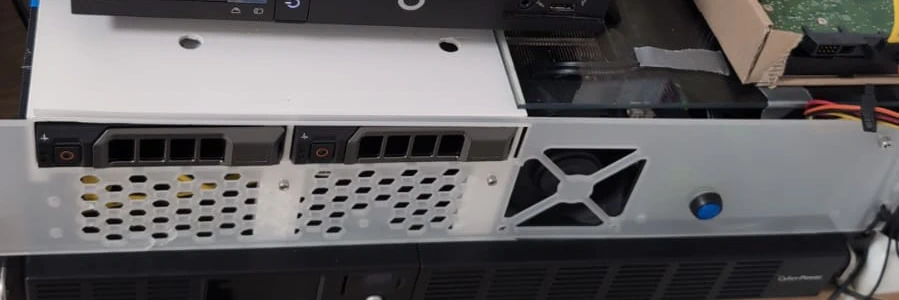
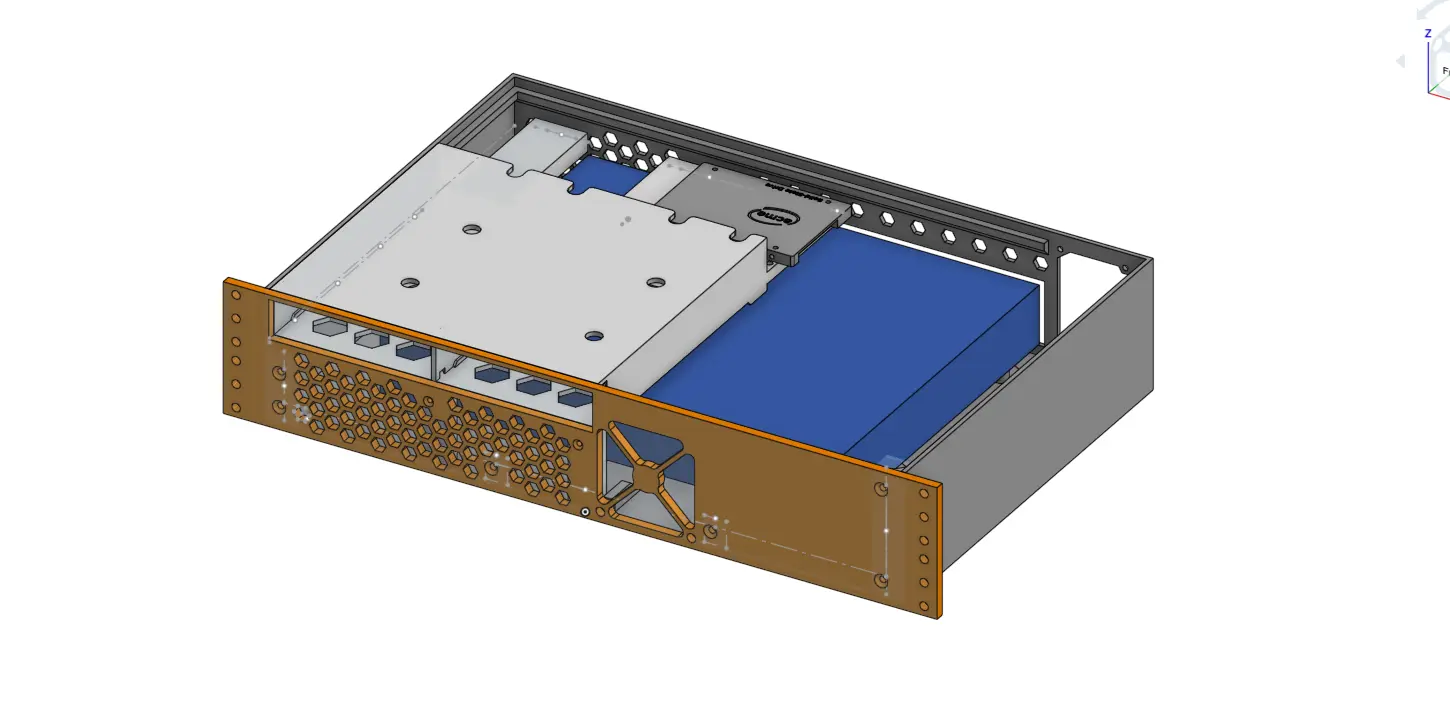
There aren’t a lot of 19" 2U cases which both fit a full ATX mainboard and are <=30cm in depth. This is why I built my own 3d printed case, which I plan to manufacture out of sheet metal in the next iteration.
Furthermore, I bought a “defective” CyberPower UPS; It only needed a battery swap. However, instead of spending >85€ for an original replacement battery, I just bought the two individual lead batteries for 9,30€ each.
All in all, here’s the BOM:
| Qty | Description | Price |
|---|---|---|
| 1x | Serverbundle ASRock E3C236D4M-4L + Intel E3-1270v6 + 32GB DDR4 ECC | 120,56€ |
| 1x | PSU: be quiet! TFX Power 3 300W | 64,90€ |
| 2x | Seagate IronWolf 4TB (ST4000VN006-DW) | 98,50€ (Σ 197,00€) |
| 1x | Samsung 120GB SATA 3 SSD | ~30€ |
| 2x | 3.5" Hotplug Hard Drive Tray PowerEdge (KG1CH) | 7,29€ (Σ 14,58€) |
| 1x | SATA Male to Female adapter (set of 5) | 4,89€ |
| 1x | UPS: CyberPower OR600ERM1U | 50,00€ |
| 2x | UPS Battery 6V 7,2Ah (CSB GP672F1) | 9,30€ (Σ 18,60€) |
| 2x | UPS Battery FSTON-Adapter 4,8 <> 6,3 | 0,40€ (Σ 0,80€) |
| Σ501.33€ |
Services
The focus for this server is to store different kinds of personal file data. For that I need a way to reliably transfer and archive files from my various network devices (Phone, Laptop, Computer). Also, if the file is removed from the source device after transfer, there should be a way to remotely access it afterwards. This does not need to be a web interface, however some of the services directly ship such. For files which are not handled by the following services and just lay on disk, I use SSHFS for remote access. I’ve decided to use these core services:
Syncthing is a fantastic file synchronization software. It works peer-to-peer, handles authenticity, integrity and confidentiality, works well on any common operating system and even manages conflicts. Since the storage server is always running and available for syncing, conflicts should not appear too often, except for when the edge device performs offline modifications.
PhotoPrism manages my photos and videos. It features deduplication, classification, face recognition, handles metadata and has a nice interface. A popular choice for personal gallery management is Immich, however “Immich requires Docker …”, which is a dealbreaker for me. Furthermore, PhotoPrism is written in Go, well maintained and supports PostgreSQL database (soon3).
Paperless-ngx manages (scanned) documents, mainly letters. It allows for OCR, classification and deduplication, full-text search and even automatic import by email or scanner.
Containerization
Guanzhong Chen wrote a great article about docker, and when/why to avoid it. Some of the services on this storage server are going to be isolated by running them in containers using systemd-nspawn.
Archivation Strategy
Some of my files are archived manually, e.g. if I find an interesting PDF or website. These are then just copied to a subfolder of my home directoy on the storage server. However, some processes seek automation, where one such is the automatic archivation of photos taken on my phone.
The Camera app of my phone stores photos in /storage/emulated/0/DCIM.
Syncthing will try to sync this directory bidirectionally with a dedicated directory on the storage server ($HOME/sync/pixel8/DCIM).
On the storage server, there’s a cronjob running which takes all files from this directoy which are older than two weeks and moves them to the archive on the same machine.
Since Syncthing is set up bidirectionally, the photos will be delete from the phone with this operation.
However, the PhotoPrism service has access to the archive, meaning I can still browse the photos remotely from the phone, but an internet connecton is required.
Backup strategy
Peter Krogh presented the 3-2-1 backup strategy in his book for Digital Asset Management for Photographers: “The DAM Book”. The rule states minimal requirements for a backup which seek to increase chances of recovering lost or currepted data.
Keep 3 copies of any important file: One primary and two backups. These copies should be stored on 2 different media. 1 of these copies is to be stored offsite.
I realized an extended version of this idea with btrfs, restic, rclone, a remote storage bucket and the above mentioned services. The concrete configuration of these tools deserves a blog post on its own.
Conclusion
This system has been running for a few months now, and I’m quite happy with it. There has been a short power outage in this time period already, during which the UPS kicked in and saved the day; It is connected via USB to the server, which allowed a graceful shutdown after 10 minutes of power outage. Once a month I perform an “upgrade day” for all installed services (if applicable), and the host itself has unattended security upgrades enabled. The general usability of this setup is proven, and I’m excited to enhance it even more in the future, which includes another iteration of the case and mounting the whole thing in a (portable) rack case. Furthermore, the backups only include the files themselfs, not the configuration and installtion data of the services. Restoring a backup is a process that wants to be well-documented and available when needed. Besides practicing the restoration process once in a while, I’m searching for a way to semi-automate this, especially when I need to be able to access the backup from a different device where my SSH keys unavailable.
-
Opening a folder with a lot of directory entries caused the app to lag and eventually crash. This was partially mitigated by categorizing the files in subfolders on a time basis, with month-granularity. ↩︎
-
This mainboard uses AMI MegaRAC BMC. See CVE-2024-54085 or this post on csoonline.com. ↩︎
-
At the time of writing, PostgreSQL support is WIP, but has been running perfectly fine for months in my setup https://github.com/photoprism/photoprism/pull/4831 ↩︎